
Protecting Flow in Kanban with WIP Buffers and Capacity Slack

A Kanban-board-driven system can sometimes appear busy while, in fact, delivering work slowly. All team members are occupied, every backlog is full, and every available hour is planned out. Yet tasks regularly wait between stages, increasing lead times, and - worse still - urgent requests disrupt ongoing commitments across the board.
Typically, this stems from a lack of capacity to absorb variability and/or an absence of flow management. You can control process flow and resolve such a system lag by adding work-in-progress buffers and creating capacity slack. These two techniques equip the team to manage variability confidently and avoid tight bottlenecks, resulting in predictable delivery.
1. Work in progress buffers
A WIP buffer is a predetermined number of tasks set to wait at a set point, or points, in a workflow. Buffers protect the downstream workflow from interruptions caused by uneven arrival rates, variable task sizes, complex dependencies, or random capacity constraints.
For instance, in a simple workflow such as Analysis → Development → Testing, Analysis may deliver tasks faster than Development can absorb them. Or, Development may finish items faster than Testing can take them on.
Without an appropriate buffer, specialists further down the process easily become idle when upstream work is delayed. However, with too much waiting work accumulating, queues and lead time increase and the system becomes unmanageable.
A buffer sized deliberately balances both these risks.

WIP limits vs. WIP buffers
While both concepts relate to constraining task volume, they serve different purposes:
- WIP limits confine the number of tasks allowed in a column or columns. They prevent overloading and reward finishing started work before picking up more.
- WIP buffers create a controlled queue of ready-to-go tasks before a column, especially before the workflow’s bottleneck. Buffers protect flow from the impact of short-term fluctuations in upstream supply.
Critically, a WIP buffer should not be confused with an unrestricted backlog; if it grows continually, it’s more likely to obscure any capacity imbalances rather than protect flow.
Example A development team may have a WIP limit of four tasks in Doing. The Doing column’s buffer may hold two or three analyzed and ready-to-start tasks.
Where are buffer stages needed?
The placement of a buffer column should relate directly to the actual source of variability and dependencies in the unique process. Unnecessary buffers before every column can increase waiting times instead of improving workflow efficiency. But stocking a limited number of analyzed, refined tasks in buffers designed in the right places could ensure utmost utilization of a team’s time. Buffers typically go:
- Between stages with a meaningful transition in work type/team, e.g., between Analysis and Doing,
- Before WIP-contstrained columns, e.g., before Doing,
- Before a specialist bottleneck, leaving which idle has a particularly high cost, e.g., before Database work.
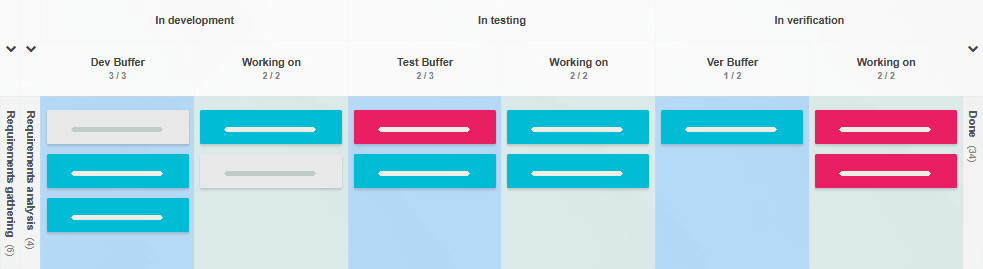
Using buffers to stabilize throughput and lead time
Because buffers help to absorb short-term differences in task arrival and delivery rates, they stabilize throughput. However, while able to minimize such avoidable interruptions, WIP buffers will not compensate for a sustained capacity mismatch. If an upstream stage consistently ships six items while downstream consumes 10 in the same time, the buffer between them will eventually empty. Similarly, if a downstream process completes fewer items than simultaneously arrive, its queue will keep growing. Buffers regulate variability, but don’t eliminate bottlenecks.
How to size a buffer?
Though it’s not rocket science, it is best to avoid sizing a buffer by intuition - start with your workflow data and adjust as you go.
- Track the buffer’s incoming and outgoing task flow.
- Observe the rate at which the buffer’s downstream stage empties.
- Control whether items aren’t waiting too long in queues (lead time).
- Note whether the buffer protects its downstream stage’s factual capacity limit, or whether it’s forcing extra tasks into a presently overloaded queue.
- Make adjustments in single steps to pinpoint if and when they make a difference.
A buffer column that empties quickly may be too small, replenished too slowly, or affected by upstream variability, and a buffer that’s always full and stores aging tasks is likely too large, or may indicate a bottleneck downstream. In both cases, an interpretation of these signals should be made in reference to the flow as a whole.

WIP buffers vs. expedite lanes
Many teams introduce an expedite lane to allow critical items to bypass normal flow rules, which is understandable. However, frequent high-priority requests will interrupt regular work and diminish process predictability.
WIP buffers serve an opposite purpose: stocking tasks ready to process, to protect flow continuity.
Using both requires careful design: a team could reserve some capacity for absolute emergencies while maintaining a small buffer of ready items for regular development.
But when using an emergency lane, the team must respect explicit entry criteria and limit concurrent expedited items.
2. Capacity slack vs. utilization
Ever wondered how come staying 100% busy isn’t equivalent to being 100% effective?
High resource utilization - the proportion of time a team spends actively working - may seem desirable because it minimizes idle time. But knowledge-based work involves uncertainty: tasks take different amounts of time to finish, dependencies occur, defects require investigation, unplanned requests crop up, etc. If a team’s capacity is already fully committed, even the smallest disruption is likely to create a queue.

High utilization maximizes individual busyness, which can be effective in highly predictable manufacturing environments. But in knowledge-work use cases, flow management should optimize tasks’ passage through the entire system.
Queuing theory explains why, in systems with variable arrival and service times, waiting times increase dramatically as utilization reaches 100%.
For a hypothetical single-processor queue of tasks, the average time in the system is:
Where:
- W is the average time in the system.
- μ [mu] is the processing rate.
- λ [lambda] is the new task arrival rate.
This simplified relationship assumes a stable task arrival and consistent service rates
(λ < μ). While Kanban processes are more complex, the underlying truth remains valuable: as incoming demand meets processing capacity, the system loses room to absorb variability. Therefore, waiting times spike.
For that reason, rationally reducing resource utilization in Kanban improves or, at the very least, stabilizes delivery rates.
The benefits and sizing of capacity slack
Capacity slack refers to the intentionally unassigned chunk of a team’s time, giving it a chance to handle deviations from the plan. It supports:
- Incorporating variable tasks
- Appropriately reacting to urgent work
- Resolving bottlenecks
- Increasing process predictability
- Continuous improvement
Of course, there isn’t a prescribed percentage of capacity to set aside for all Kanban teams, as the right amount will depend on demand variability, service-level expectations, task complexity, dependencies, and the cost of delay. In practice, it is best to analyze past demand and gauge how much uncommitted capacity will suffice to absorb typical fluctuations without frequently disrupting planned work. Very often, setting aside 10-15% of available capacity is an appropriate starting slack value.
Did you know?
A simple way to build capacity slack into a week’s work is to estimate the time required for each planned task, and ensure the total stays within 85–90% of the team’s capacity.
In Kanban Tool®, you can do this using the Estimated Time field, and setting WIP limits
by estimated time on the weekly Backlog column.
Importantly, make a point of reviewing the set policy against real-life outcomes, verifying the frequency of unplanned tasks displacing the scheduled ones and of blocked tasks occurring, as well as whether the lead time and throughput turn more predictable. Be sure to also observe if allowed slack is used to accommodate variability, or if it remains unused due to the demand being below expectations. On the other hand, should the set aside uncommitted time routinely get exhausted, look into whether demand exceeds capacity, if there is too much WIP, or whether any of the bottlenecks need re-thinking.
3. WIP buffers and capacity slack working together
The two concepts address different forms of variability: a buffer stage supplies tasks ready to be worked on, and capacity slack offers room to do unplanned work and mitigate effort fluctuations.
Example A software team does both product development and tech support. They keep three analyzed tasks ready for development and reserve a part of their weekly hours for production incidents and unplanned work. When analysis delays, the ready-work buffer lets development carry on. When an incident occurs, capacity slack allows the team to deal with it without immediately impacting all other work.
Both of these tools have their limits: a WIP buffer won’t compensate for a continuous underproduction upstream, and no amount of slack will help a generally overloaded process. Their usefulness relies on workable WIP limits, explicit policies, and careful inspection of process metrics.

- WIP limits control the volume of work accepted by the system.
- WIP buffers ensure continued engagement between process stages.
- Capacity slack delivers the ability to respond when demand or effort fluctuate.
When synchronized, the three mechanisms help teams to maintain a balance between rapid delivery
and responsiveness, while also sustaining predictable outcomes.
4. Dispelling misconceptions

- “The team needs to be busy at all times”
Making this your policy optimizes individual utilization but increases the likelihood of system-wide queues.
Spare capacity is a necessity when demand and processing times are unstable. - “Building buffers is wasteful, since they contain unfinished work”
An ever-growing buffer can be wasteful, but a deliberately sized one helps to prevent expensive interruptions and minimize downstream idleness. Like anything else, it’s valuable only when it improves the overall flow. - “Higher WIP means we’re highly productive”
Competing, concurrent tasks demanding attention equal an increase in energy-draining context switching; they hide priorities and extend lead times. Sticking to low WIP limits promotes finishing what’s already started. - “Providing slack promotes team idleness”
Slack should be thought of as a strategic backup/reserve, kept to address unplanned demand, defects, dependencies, as well as improvement opportunities. - “Seeing the buffer empty means it’s too small”
An empty buffer may indicate insufficient upstream capacity, poor replenishment policies, or a temporary demand spike. Increasing the size of a buffer, without first pinpointing the cause of it getting empty so fast, can conceal the root causes (e.g., poor upstream capacity, temporary demand fluctuation).
Summing up
A well-designed Kanban system stays effective by moving valuable tasks through the system at a sustainable pace, rather than by keeping every team member and every process stage busy at maximum capacity. The goal is to create strong protection from variability without creating excessive queues or unnecessary idleness.
By carefully measuring flow, respecting constraints, giving the team room to respond, and using evidence to adjust the process, a Kanban team can build high resilience without sacrificing delivery performance.

Further reading:
- Work-In-Process Buffer Management Using the Rational Commitment Model in Repetitive Projects (Research article)
- Optimal design of work-in-process buffers (Research article)
- Investigating the Relationship between Labor Productivity and Work-In-Process Buffers: A Case Study (Research article)
- Slack resources and growth performance: The mediating roles of product and process innovation capabilities (Research article)
 Český
Český Deutsch
 Español
 Française
 Italiano
 Polski
 Português
 Русский