
How to recover an account locked with 2FA?
If you’ve enabled two-factor authentication but no longer have access to your authorization codes, follow these steps to regain access:
- Use your recovery code.
Locate the recovery code you saved when setting up 2FA.
Enter the recovery code to disable 2FA and log in. - Contact your account owner.
If you’ve lost your recovery code, reach out to your account owner. Account owners can disable 2FA for users via the People page. - If you are the account owner, contact us.
If you’re the only account owner and have been locked out, contact us at support@kanbantool.com.
We’ll verify account ownership and disable 2FA for you.
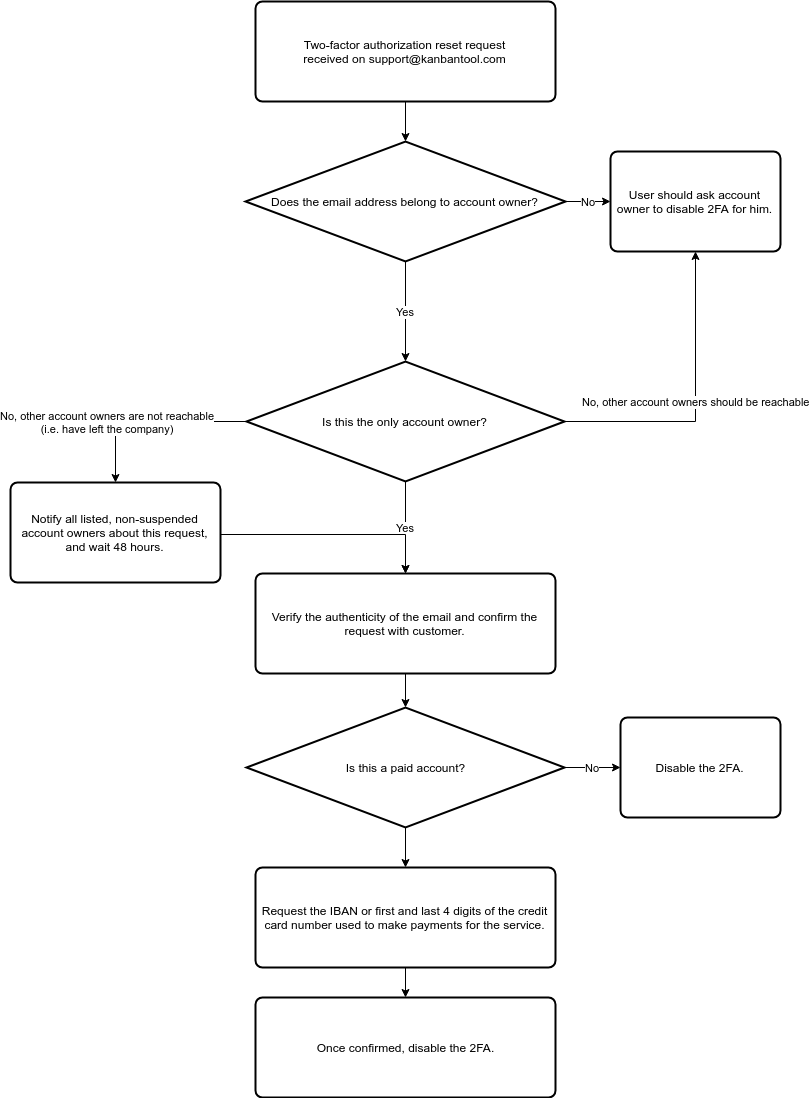
Note, the above diagram is just an overview of the recovery procedure and may be subject to change without prior notice.
 Český
Český Deutsch
 Español
 Française
 Italiano
 Polski
 Português
 Русский