
Forecasting and Improvement Through Deeper Kanban Metric Analysis06 May 2026
A team relying on a digital Kanban board with automatic progress tracking quickly learns the definitions of throughput, lead time, and cycle time. Team members see them tracked by the system, and consider what the numbers may be suggesting. However, raw values usually only scratch the surface of the matter; the real value emerges when flow metrics are analyzed over time - when trends, anomalies, and correlations become subjects of interrogation, not just reporting. That’s the point at which they evolve from numbers to signals.

Beyond counting completed items
On the surface, throughput may appear to be little more than a tally of how many items a team delivers in a set time. Considering it as such is limiting, because a single number hides volatility. Plotting throughput on a run chart, however, can reveal much more: a sharp spike might point to a batch release, a sudden dip could reflect a systemic bottleneck.
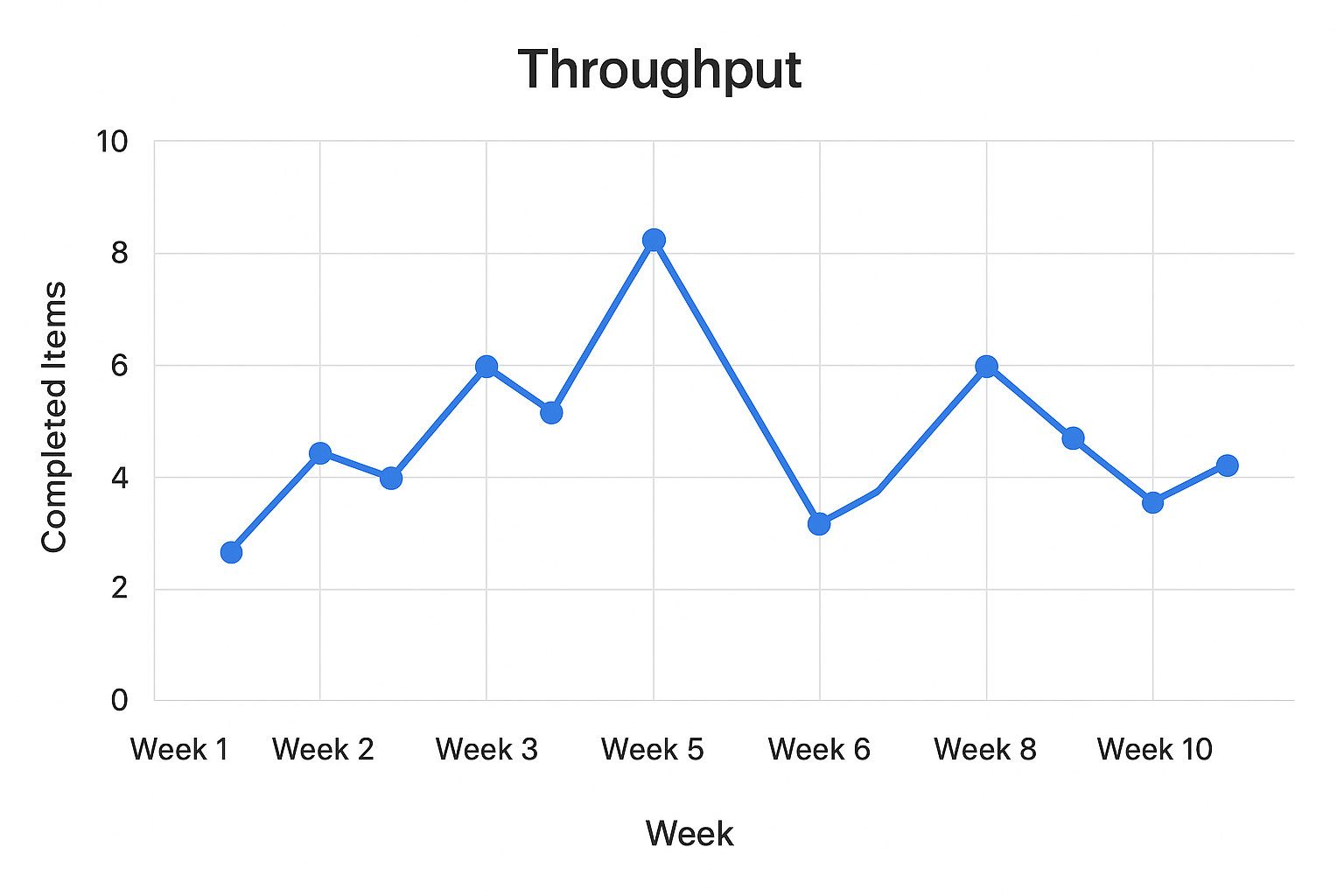
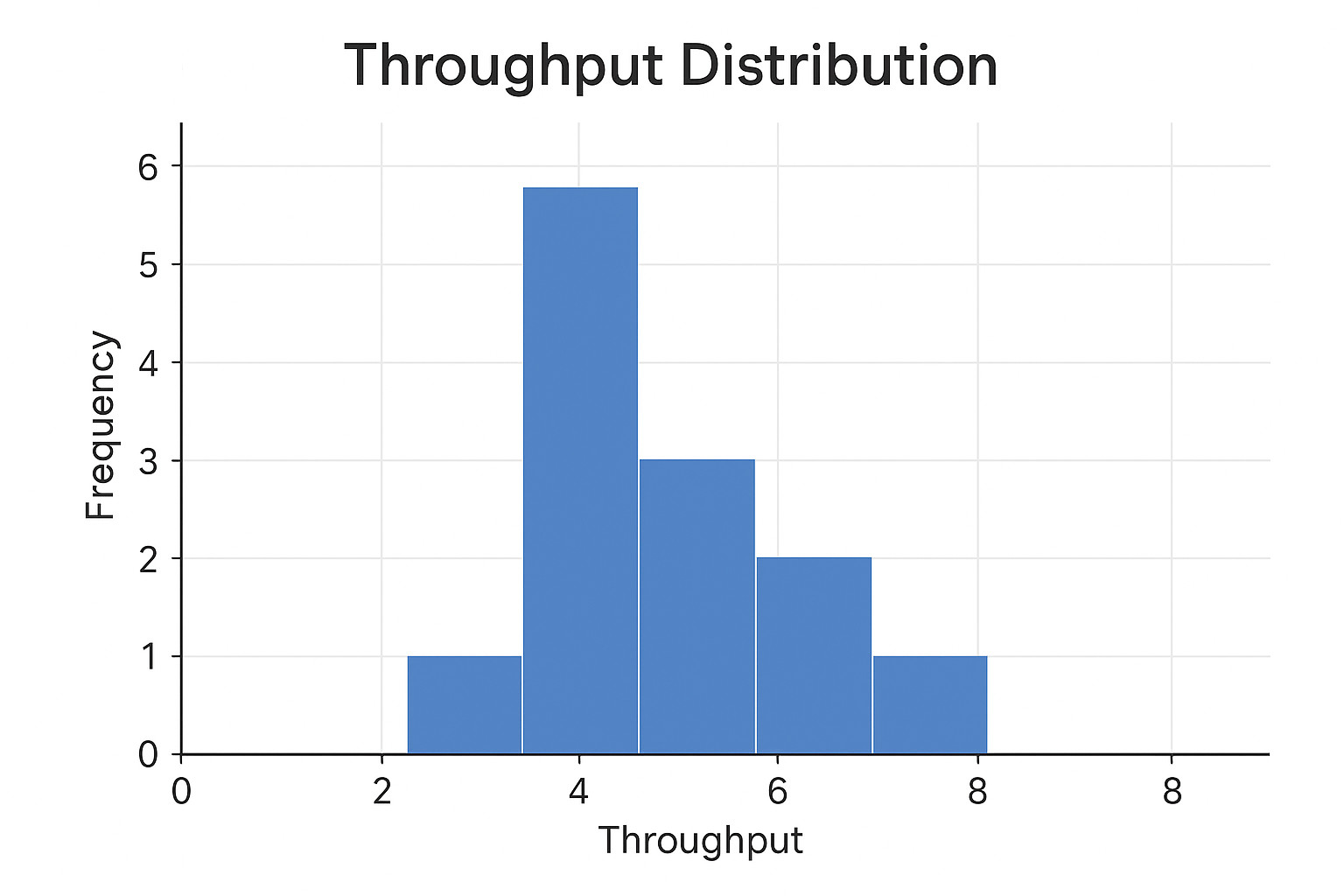
A further revealing picture comes from examining the distribution. For example, is throughput consistently clustered around a median, or does it oscillate? Stable throughput will be indicative of predictable delivery capacity, while erratic throughput values would suggest hidden dependencies, uneven demand, or workflow frictions. Stable throughput supports reliable capacity planning, whereas recognizing and analyzing erratic throughput is key to diagnosing systemic issues.
Detecting patterns in flow
The lead time (request to delivery) and the cycle time (actual work start to delivery) typically receive attention only as single averages, which can be deceptive. Averages compress outliers into a neat number, concealing the factual experience of work. A cumulative flow diagram (CFD), or a cycle time scatterplot, will help uncover whether items are reliably completed within a certain band or if there’s a long queue of delayed work.
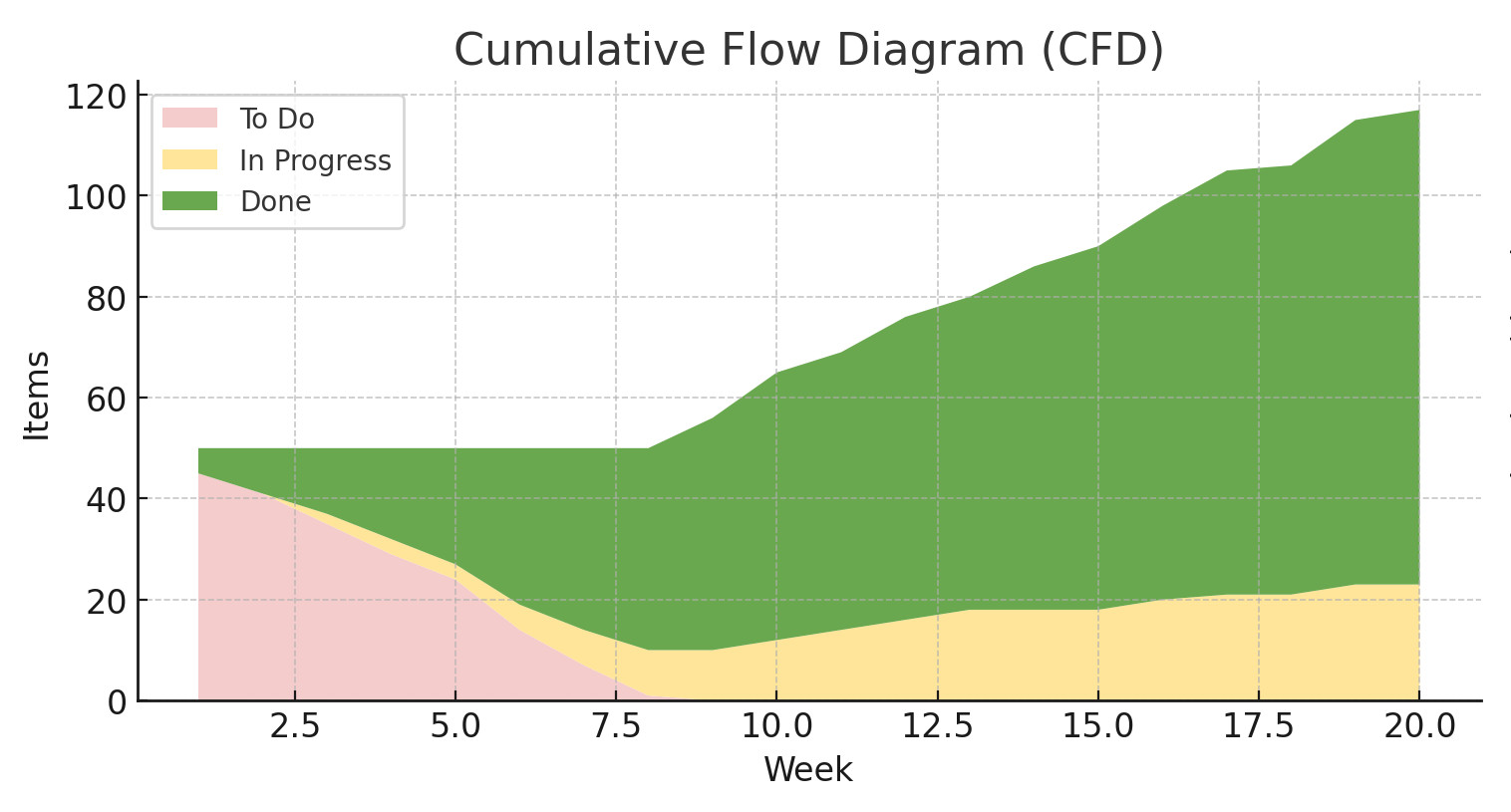
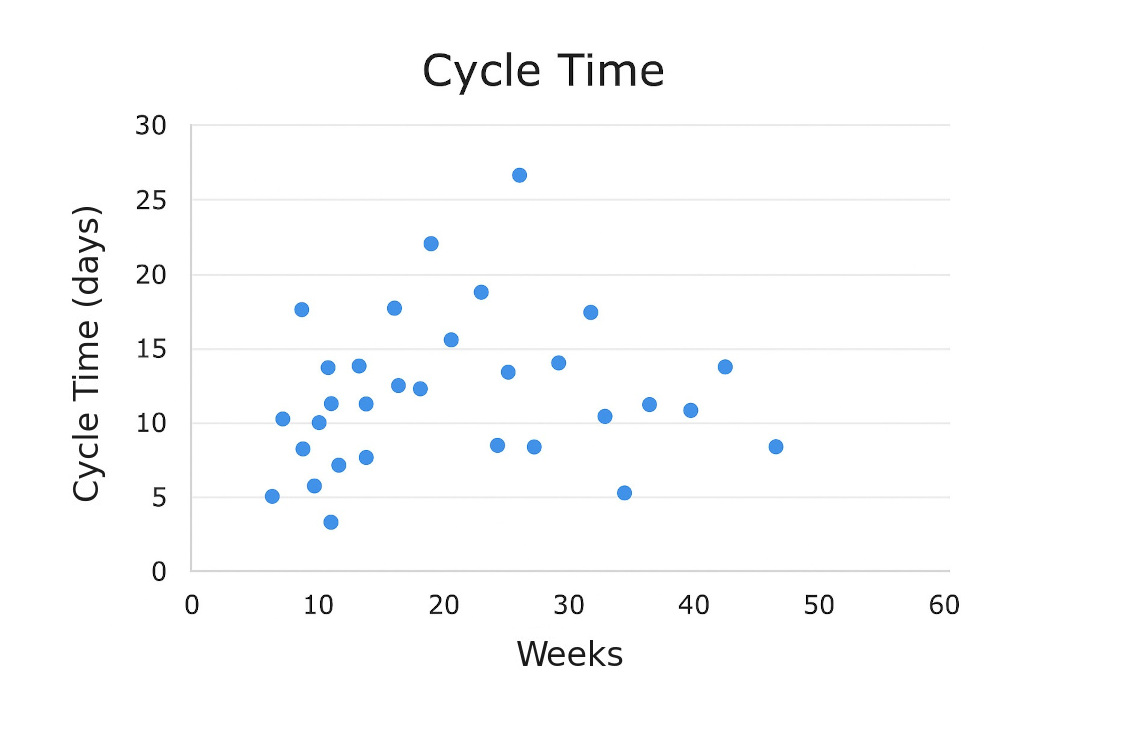
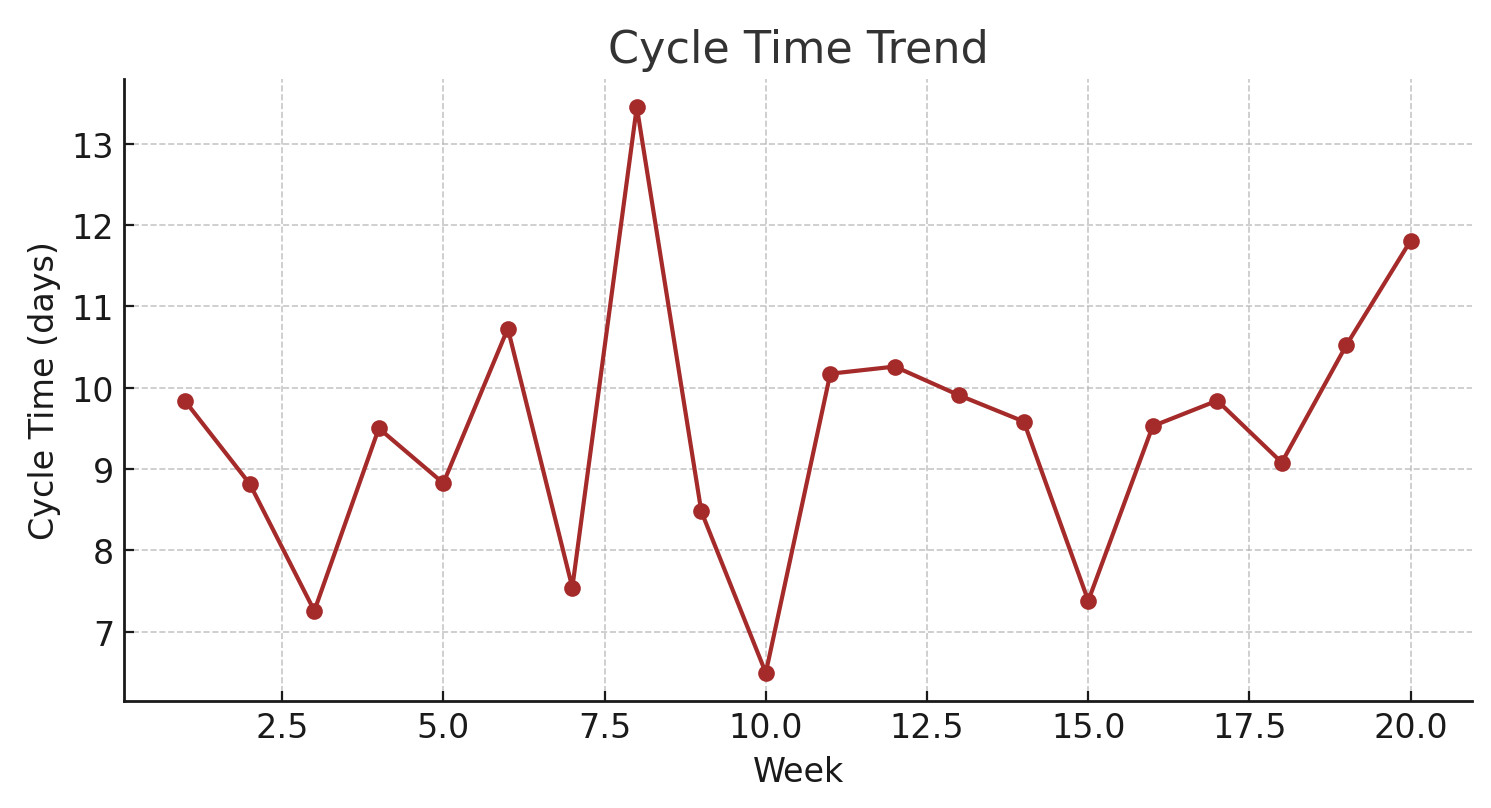
Tracking these metrics as time series adds another layer of insight. For example, an upward tendency in average cycle time may not trigger alarms in a weekly snapshot, but over several months, it can indicate that work-in-progress policies are slipping, queues are extending, or that upstream quality may be deteriorating. Detecting such drifts may allow teams to intervene before delivery predictability collapses.
Where different metrics meet
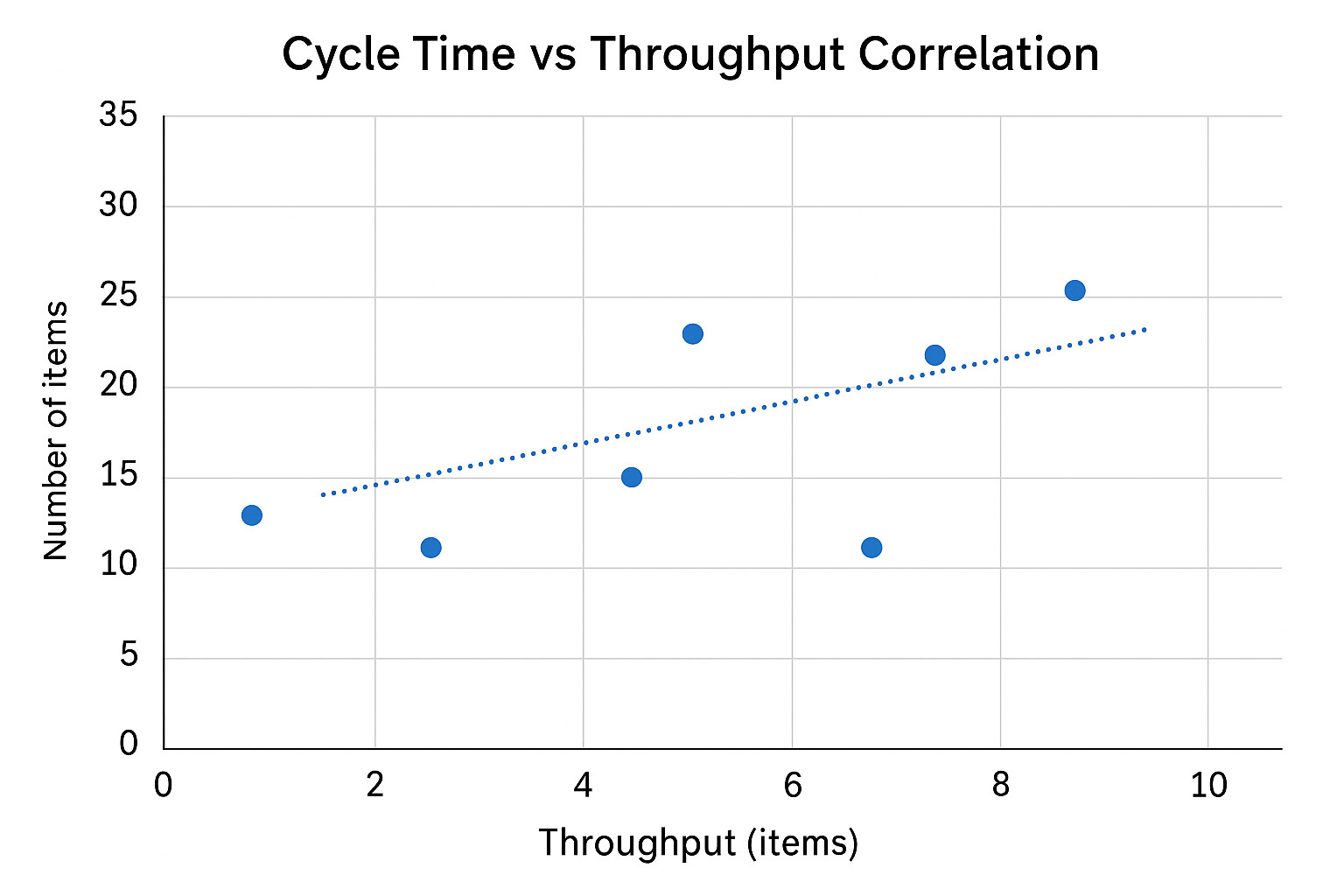
Big-time learning about your team's process begins when all metrics are compared; throughput and cycle time, for instance, are not independent. A sustained increase in cycle time without a corresponding drop in throughput may mean that the team is delivering more, but at the cost of pushing items through with higher effort or burnout risk. Conversely, a drop in throughput paired with rising cycle time could suggest that systemic bottlenecks are adding up.
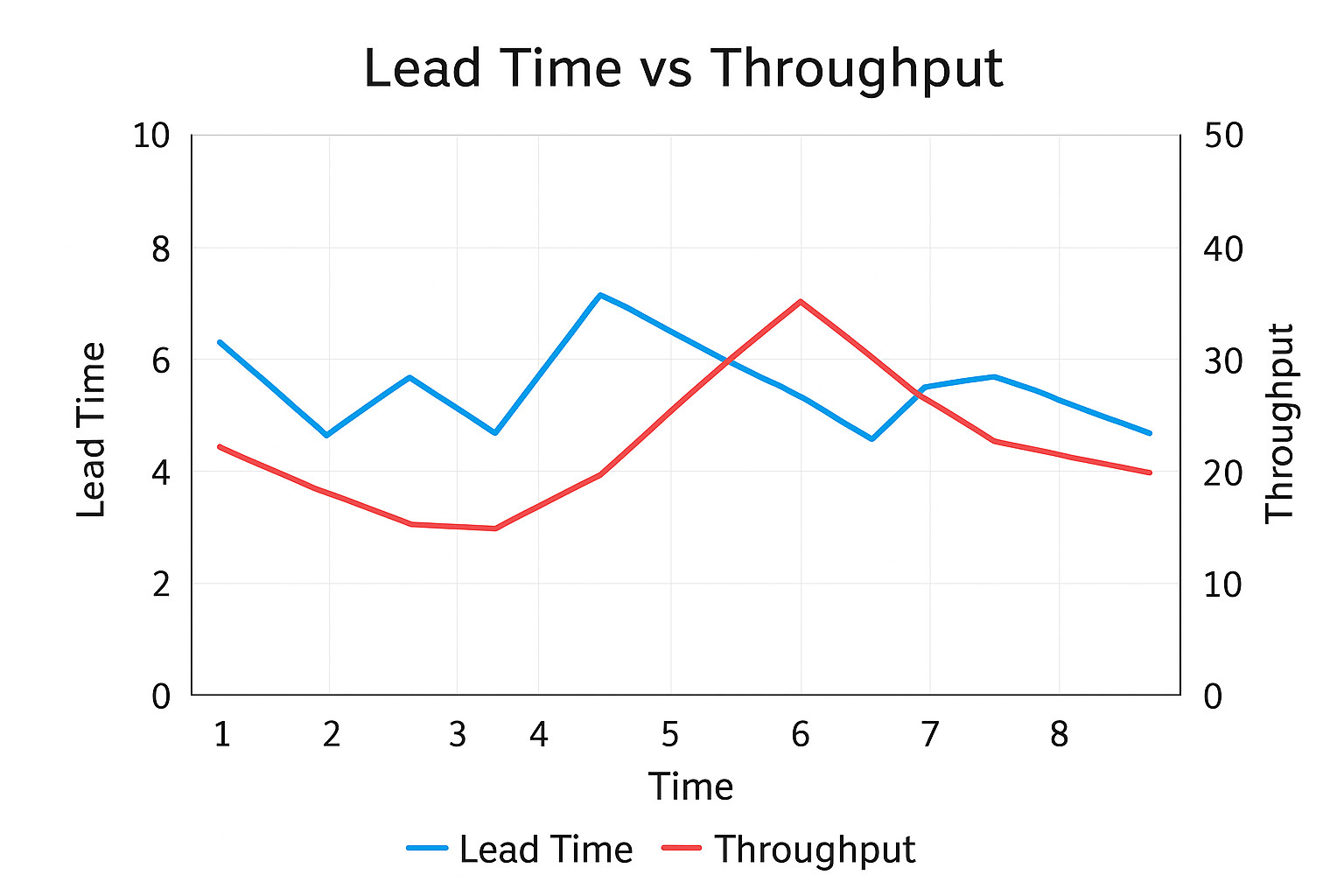
Lead time and throughput correlations can highlight demand–capacity mismatches; if incoming requests consistently outpace throughput, lead times inevitably grow. Recognizing such a pattern may prompt the team to start a conversation with stakeholders about rebalancing demand, setting more realistic expectations, or securing additional capacity.
Spotting anomalies and outliers
Not all anomalies are bad news, for instance, a sudden surge in throughput may reflect successful automation, and a sharp dip in cycle time could be the result of smaller, better scoped work items. What matters is asking why anomalies occur, over smoothing them away as noise. Outlier analysis can often expose systemic issues: a single task that sat in progress for three weeks could signal an upstream dependency that has silently constrained delivery for months up to that point.

Continuous improvement through flow insights
Perceiving process metrics as living signals shifts their role from a performance scoreboard to a feedback mechanism. A team that studies the shape of its throughput distribution, the drift of cycle time, or the correlation between demand and capacity gains a richer understanding of how work flows through the system. That, in turn, enables targeted experiments, such as adjusting WIP limits, or rebalancing staffing levels.
In the long run, these insights also support capacity planning. Instead of promising delivery on the basis of intuition or a single average, teams can rely on throughput distributions and cycle time bands to forecast with much higher confidence. This increases both predictability and credibility with stakeholders.

The deeper discipline of flow
Metrics aren't answers, but questions in numeric form. When teams learn to treat them as signals in conversation with each other - and as evolving trends rather than static snapshots - they develop a sharper sense of their system’s health. The payoff is not (just) more charts to gather, it's a more disciplined ability to see, predict, and improve the flow of work.
The Hidden Costs of an Over-Complicated Kanban Board14 Apr 2026
The humble Kanban board doesn't receive enough praise for its elegance: a simple layout of process-step-based columns, a set of color-coded cards, and clear rules for flow. This simplicity and intuitiveness of the system are certainly its core strengths. Yet what begins as a straightforward...
Weekly Kanban Check-In: Stay in Flow04 Mar 2026
When used effectively, a team's Kanban board is a living system that tracks the state of work. But when it drifts from reality: cards pile up in odd places, blockers are being ignored, team members vanish from the flow - its value rapidly declines. A once-a-quarter overhaul, while helpful, will...
Don’t Be the Bottleneck: Do’s and Don’ts for Kanban Team Managers09 Feb 2026
For teams using Kanban to track their workflow, the board is a living system reflecting the state and dependencies of work in process. And, for the team manager, the Kanban board should not be a playground for intervention, nor a performance stage, but a diagnostic instrument. Used correctly,...
Stuck No More: Understanding and Eliminating Work Stagnation19 Jan 2026
Work items lingering in the middle of a process, half-built, half-reviewed, or half-thought-out, are a structural and cultural signal that something isn’t flowing the way it should. Although many would interpret stalled tasks as personal failures or laziness, they’re rarely that. Usually, the...
Perfecting the Kanban Card Design to Make Every Task Clear, Actionable, and Traceable10 Dec 2025
Teamworking ability aside, a team's Kanban board can only be as effective as its cards. In a way, treating the cards as mere to-do items or scribbled reminders wastes the power of the system. A thoughtfully constructed card should represent a task along with the intent, scope, next steps, and...
Automating Cyclical Work in Kanban for Higher Efficiency12 Nov 2025
In a typical knowledge-based work scenario, managing a Kanban board 100% manually works OK for the first few weeks — until one too many recurring task slips through the cracks, someone forgets to compile a weekly report, and you're knee-deep in reviewing items you already reviewed last Thursday....
Dynamic Kanban: Designing Adaptive Boards for Changing Priorities13 Oct 2025
Visual clarity and simplicity are some of Kanban boards' core strengths, but what if the clarity turns into rigidity? When workflows mutate - whether due to shifting priorities, unexpected bottlenecks, or evolving product goals - a static board can silently start to erode team efficiency....
Supporting Concurrent Project Streams with Kanban09 Sep 2025
When a team runs concurrent project streams—whether in software, marketing, research, or operations—work visibility can degrade rapidly. Although Kanban offers a simple framework made of columns, cards, and their flow tracking, if left naïvely configured, a single Kanban board can easily...
Micro Policies Guiding Macro Benefits in Team Workflow05 Aug 2025
There is a particular kind of momentum that drives high-functioning teams. It rarely emerges from talent alone, but rather comes from a well-thought-out structure rich with detail — specifically, detail that's intentionally minimal, deliberately enforced, and mutually understood. Talking...
Get started with Kanban Tool
Sign Up Follow us on Twitter
 Join us at Facebook
 Follow us on LinkedIn
 Subscribe via RSS
 Český
Český Deutsch
 Español
 Française
 Italiano
 Polski
 Portuguese
 Русский